

Specto+
Network X-ray vision
for the people in charge
Specto+ shows you which machines are really on your network, which of them an attacker could reach, and what to fix first. It runs on your own network, on your own hardware: one virtual machine that you import and connect. It is not a cloud service.
WHAT IT DOES
Six parts. One appliance.
Internal Visibility is free. The other five come with the trial and the Professional edition.
01
Internal
Visibility
FREE
02
Attack
Surface
PRO
03
Phantom
Bait
PRO
04
SOC
Drills
PRO
05
Executive
Readiness
PRO
06
Endpoint
Control
PRO

THE QUESTION
You already own security tools. You still can’t answer one question.
Devices arrive without a ticket.
Services stay open after a project ends.
A report says “no findings”, and it gets read as “secure”.
"Are we actually safe?"
PART 01 OF 06
Internal Visibility
✓ FREE
Every device the appliance can reach, what it runs, and which known weaknesses apply to it, including whether each device was checked in full.
-
Finds devices by ARP every 90 seconds on the subnet it is attached to
-
Quick scan of about 110 common ports every 15 minutes; a full TCP scan of each device every 30 days
-
Matched against the NIST National Vulnerability Database and the CISA Known Exploited Vulnerabilities catalog
-
A “Fix first” list ranks one row per fix, with known-exploited issues on top
-
Every device record exports to PDF or CSV
-
Watches the traffic that reaches it for known attacks: each alert names the source, the target and the severity. A mirror port on the switch widens what it sees.
Leaves the appliance · Nothing about the devices. Vulnerability data is only downloaded.
Devices

Vulnerabilities

Alerts


PART 02 OF 06
Attack Surface
What of yours is reachable from the internet, as an attacker sees it.
-
Only the domains and public addresses you declare and authorise
-
Ports and services across the full TCP range, matched under the same evidence rules as the inside
-
SPF and DMARC: whether others can send mail in your name
-
Certificates, subdomains, open cloud storage, exposed files, leaked-secret candidates
-
An exposed file counts only when the server’s reply proves it; a bare “200 OK” never does
Leaves the appliance · The declared domains and their hosts, to the lookup services and as scan targets.

PART 03 OF 06
Phantom Bait
A decoy machine inside the network that nobody has a reason to touch, so any contact is a warning worth investigating.
-
Cloned from a real machine you choose: its open ports and replies
-
Its own address and hardware address, so it looks like a separate machine
-
An interactive fake shell records every command typed into it
-
Each contact keeps a slice of the network traffic as evidence
Monday morning · illustrative
One entry in the decoy alert list: a laptop in accounts made contact with the decoy file server on Saturday at 02:14. The record shows which laptop, when, and exactly what it sent. Nobody in accounts works on Saturdays.
Leaves the appliance · Nothing. With several sites, decoy contacts go to your own main appliance.
PART 04 OF 06
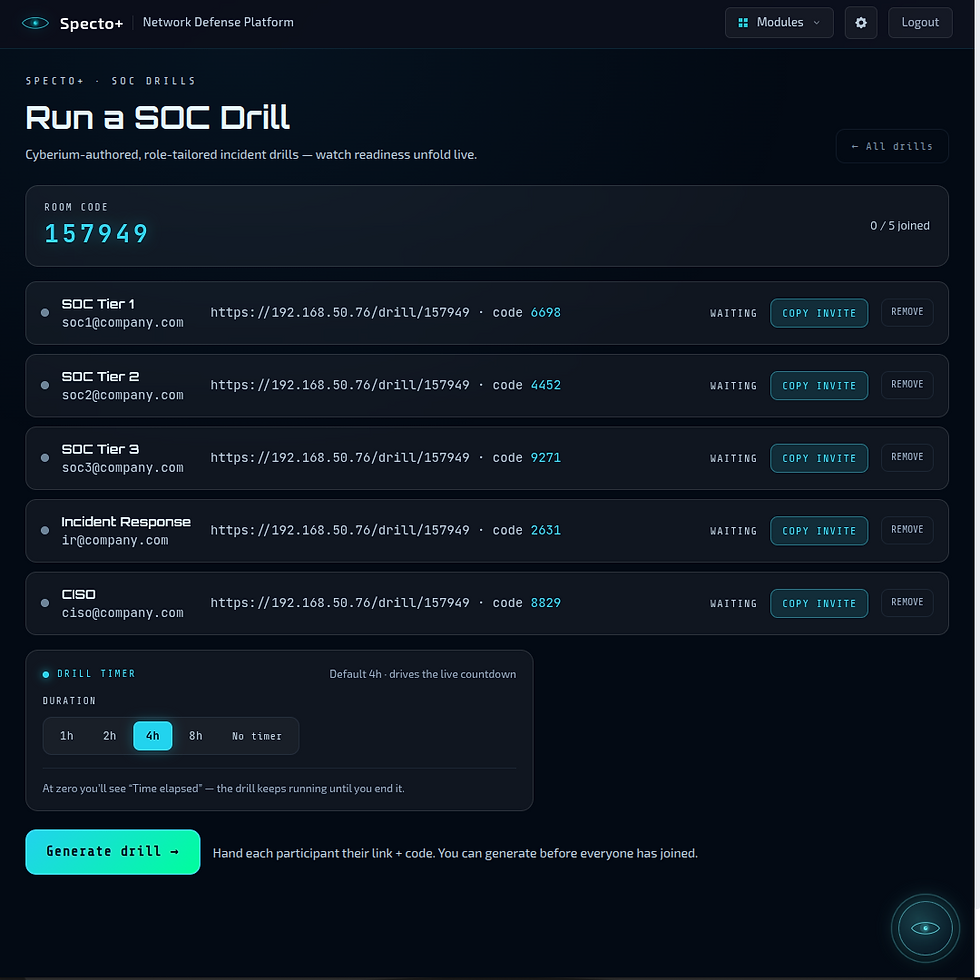
SOC Drills
Hands-on incident exercises for the security team, built from a real attack we captured on our own decoy servers.
-
Roles: SOC Tier 1, 2, 3 and Incident Response
-
The incident comes with its original logs and packet captures
-
Players join from their phones with a code; answers are scored automatically
-
Unlimited drills on a Professional licence
Leaves the appliance · Roles, experience in months, language and an anonymous identifier. No network data.

PART 05 OF 06
Executive Readiness
A tabletop crisis exercise for managers, built from what your own appliance found.
-
The scenario starts from your own devices, weaknesses and exposure
-
The CISO reveals the crisis turn by turn; each role records its decisions
-
Closes with a scored after-action report: strengths, gaps, recommendations, as PDF
-
Uses your own AI model
Leaves the appliance · A summary of the security posture and the participants’ answers, to the AI provider you chose only.
Isolating a machine
Everything in and out is blocked except the appliance, and connections that are already open are closed. Only Specto+ can still reach that machine. It never ends by itself: a person presses Release. Domain controllers cannot be isolated, and the appliance can never isolate itself. If the appliance is switched off while machines are isolated, they stay isolated until someone releases them at the machine.
Leaves the appliance · When Cy proposes an action, the question and the list of actions it may choose from go to the AI provider you chose.
With a model on your own network, nothing leaves. Your sign-in account and everything the appliance reads never leave.

PART 06 OF 06
Endpoint Control
Finding the problem is half of it. Endpoint Control is how you act on the machine itself, from the same screen, with an account you provide and nothing installed on it.
-
Windows over WinRM, Linux over SSH, with an account you provide. No agent, and nothing left behind
-
Reads what is really there: programs, services, disk encryption, firewall and antivirus, local admins, shares, startup items, scheduled tasks, browser add-ons, USB history and who is logged on
-
What your account cannot read is shown as “could not read”, never as clean
-
Acts from a fixed list: stop or restart a service, find a file by name or hash, remove software or a browser add-on, isolate a machine. There is no free-form command
-
One action at a time: it is proposed, an admin approves it, and it expires in 30 minutes if nobody does
ACROSS ALL SIX · IN EVERY EDITION
Cy, the AI advisor
Answers questions about what the box found, in plain language. It uses your own AI: your own account with a cloud provider, or, on a paid edition, a model running on your own network, so in that setup no question leaves the building. We charge nothing for AI and we run no AI service.
Vulnerability information
Fetched from the public NIST and CISA databases. Your device list is not sent.
Default
Licence activation
One call when a licence code is entered. There is no scheduled check-in.
Once
Attack Surface
Scans of your own public addresses, and lookups about your declared domains.
When you switch it on
SOC Drills
The roles, experience in months, language and an anonymous identifier for a drill. No personal or network data.
When you request one
Cy
A question and the findings needed to answer it, to the AI provider you chose.
When you set it up
Updates and support access
An update check; a support tunnel the box opens itself, for the time you choose.
Only when an admin switches them on

YOUR DATA
What leaves the network
The question a self-hosted buyer asks in the first five minutes. Here is the full answer. Nothing ever connects in from ThinkCyber. The box only makes connections it starts itself.
EDITIONS
Three editions.
No device limit in any of them.
Free
Free, and it does not expire
Trial
30 days, with one 30-day extension
Professional
A yearly licence
Devices
No limit
No limit
No limit
Internal Visibility
Yes
Yes
Yes
The five paid parts
No
Yes
Yes
Cy, the AI advisor
Yes, with your own AI account
Yes
Yes, including a model you run yourself
Several sites on one view
No
No
Yes
Free lets you see. Professional lets you investigate, act, deceive and exercise.
When a paid licence ends, everything keeps working for 30 days.
Then the free parts carry on working and the paid ones stop. Their data stays readable.